In today’s global digital marketplace, a single-language website is no longer enough to reach your full audience. If you want to create multilingual WordPress website that truly works and attracts international visitors, you need the right strategy from the start. This guide will walk you through everything you need to know to build a properly structured and fully optimized multilingual website.
Creating a multilingual WordPress website is not just about translating content. It requires choosing the right approach, structuring your URLs correctly, optimizing for multilingual SEO, and ensuring your themes and plugins fully support multiple languages. In this complete support guide, you will learn how to set up, manage, and optimize a multilingual WordPress website step by step while maintaining performance, design consistency, and search engine rankings.
Also Read: The AI Plugins You Need to Enhance Your WordPress Site
Why Make Your WordPress Website Multilingual?
Expanding your WordPress website into multiple languages allows you to connect with audiences beyond your local market. Many users prefer browsing and making purchasing decisions in their native language. A multilingual website helps you build stronger engagement, better trust, and higher conversion opportunities across different regions.
- Reach a Global Audience – Translate your content to attract visitors from different countries and language backgrounds.
- Improve User Experience – Users feel more comfortable and confident when content is available in their native language.
- Increase Search Visibility – Rank in multiple countries and languages through proper multilingual SEO setup.
- Boost Conversions and Sales – Customers are more likely to purchase when they clearly understand your content and offers.
- Stay Ahead of Competitors – Many websites operate in one language only, giving you a competitive advantage when you offer more.
Key Benefits
- Higher Organic Traffic:
Multilingual content allows your website to appear in international search results. - Better Brand Credibility:
Speaking your audience’s language increases trust and professionalism. - Stronger Local Market Penetration:
You can target specific countries with tailored content strategies. - Improved Engagement Metrics:
Lower bounce rates and higher session times when users understand your content. - Long-Term Business Growth:
A multilingual strategy creates sustainable global expansion opportunities.
A multilingual WordPress website is not just a technical upgrade, it is a strategic growth decision. When implemented correctly, it supports international SEO, enhances user trust, and opens new markets for your business. If your goal is long-term digital growth, going multilingual is one of the smartest moves you can make.
Top Plugins for Multilingual Integration in WordPress
Selecting the right plugin is essential if you want to create multilingual WordPress website that runs smoothly and performs reliably. The right tool will help you manage translations, handle multilingual SEO, and maintain website performance without complications. Let’s now explore the top multilingual plugins one by one so you can choose the best option for your needs.
1. WPML (Premium)

Best For:
Business websites, large content platforms, and WooCommerce stores that require a complete and professional multilingual solution. It is ideal for users who need advanced translation control and scalable features.
Features
- Translate pages, posts, custom post types, and menus
- Advanced translation management system
- Multilingual SEO support
- WooCommerce compatibility
- Works with most themes and plugins
WPML is a powerful premium plugin designed for serious multilingual projects. If you want full control, scalability, and long-term reliability, this plugin is a strong choice.
2. Polylang (Free + Pro)

Best For:
Small to medium websites, blogs, and business sites that need a flexible multilingual solution without a high initial cost. It is ideal for users who want a lightweight plugin with both free and premium options.
Features
- Create and manage multiple languages
- Translate posts, pages, categories, and tags
- Add customizable language switcher
- SEO friendly URL structure
- Pro version support for WooCommerce
Polylang offers a balanced combination of simplicity and flexibility. It is a great option if you want solid multilingual functionality with the freedom to upgrade as your website grows.
3. TranslatePress (Free + Pro)

Best For:
Beginners, bloggers, and small business owners who prefer a visual and easy translation process. It is ideal for users who want to translate directly from the front end of their website without technical complexity.
Features
- Visual front end translation editor
- Translate pages, posts, themes, and plugins
- Automatic translation integration option
- SEO friendly multilingual URLs
- WooCommerce support in Pro version
TranslatePress makes the process simple and intuitive by allowing you to translate your website directly from the front end. If your goal is to create multilingual WordPress website without dealing with complex technical settings, this plugin offers a flexible and beginner-friendly solution that is easy to manage.
4. Weglot (SaaS-Based)

Best For:
Businesses and eCommerce websites that want a fast, automated multilingual setup without managing complex configurations. It is ideal for users who prefer a cloud based solution with minimal technical effort.
Features
- Automatic website translation with manual editing option
- Supports over 100 languages
- SEO optimized translated pages with proper language URLs
- Easy integration with WordPress
- Centralized cloud based translation dashboard
Weglot offers a quick and scalable way to make your website multilingual without heavy setup. If you want speed, automation, and a managed solution, this SaaS based platform is a strong option.
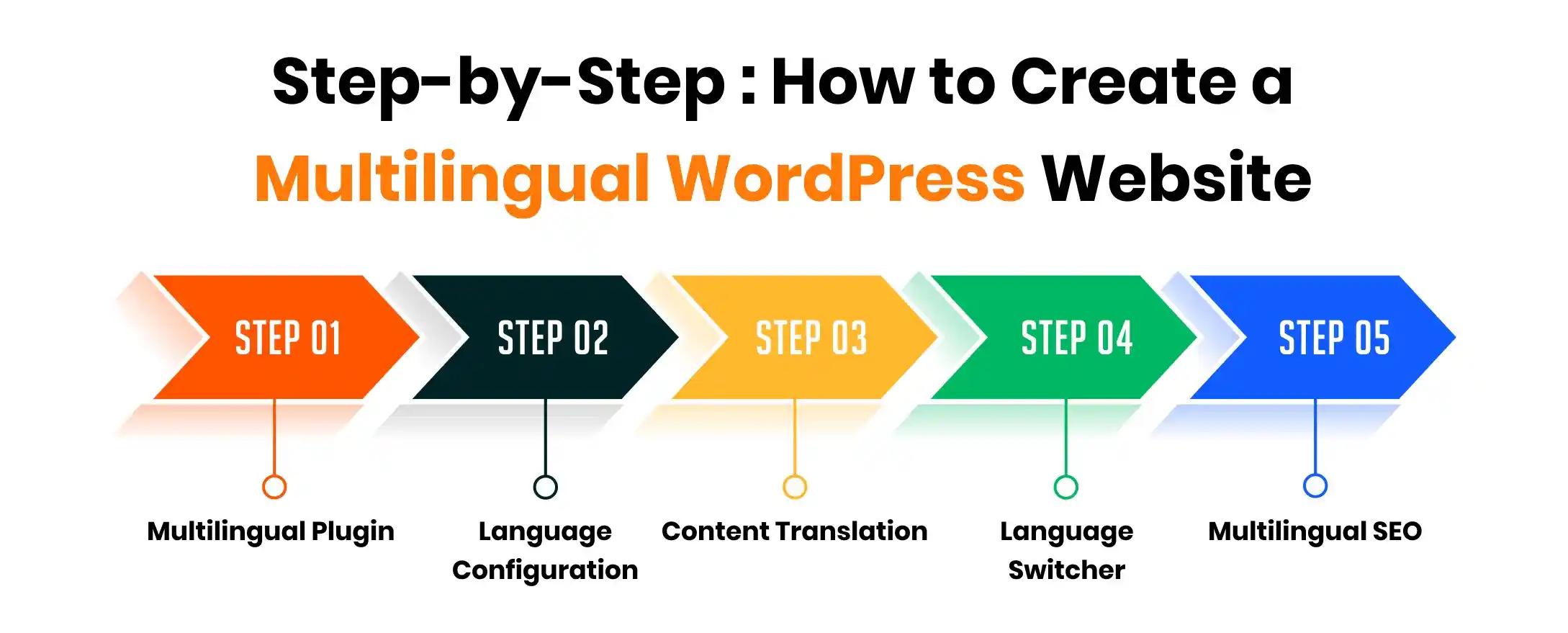
Step-by-Step: How to Create a Multilingual WordPress Website
Step 1: Choose and Install a Multilingual Plugin
The first step is selecting a reliable multilingual plugin that fits your website goals and budget. Once chosen, you need to install and activate it properly to begin the setup process.
- Log in to your WordPress dashboard
- Go to Plugins and click Add New
- Search for your preferred multilingual plugin
- Click Install Now and then Activate
- Open the plugin settings to start configuration
Step 2: Configure Default and Additional Languages
After activating the plugin, the next step is to set your website’s default language and add the additional languages you want to offer. This ensures your content is properly structured for multilingual display.
- Select your primary website language
- Add one or more secondary languages
- Configure language switcher settings
- Choose URL structure for each language
- Save and apply the language settings
Step 3: Translate Your Content
Now it’s time to start translating your website content into the selected languages. This includes pages, posts, menus, and any important on-site text that users interact with.
- Open a page or post you want to translate
- Create a version for each added language
- Translate the content manually or using the plugin tools
- Review formatting and layout after translation
- Save and publish the translated version
Step 4: Add a Language Switcher to Your Website
A language switcher allows visitors to easily select their preferred language. Placing it in a visible location improves usability and ensures a smooth browsing experience.
- Go to your plugin’s language switcher settings
- Choose display style such as dropdown, flags, or text
- Add the switcher to your menu, header, or footer
- Adjust design settings to match your theme
- Test the switcher on different pages
Step 5: Optimize for Multilingual SEO
Creating translations is not enough when you create multilingual WordPress website, you also need to optimize each language version for search engines. Proper multilingual SEO helps your website rank in different countries and languages, ensuring your content reaches the right audience globally.
- Set unique meta titles and descriptions for each language
- Use SEO friendly URL structures such as /fr/ or /de/
- Ensure hreflang tags are properly configured
- Submit multilingual sitemaps to search engines
- Test indexing using tools like Google Search Console
Also Read: Protecting Your Site : Top WordPress Plugins for Maximum Security
Common Mistakes to Avoid When Creating a Multilingual WordPress Website
Creating a multilingual website can significantly expand your reach, but small mistakes can affect SEO, user experience, and performance. Many website owners focus only on translation and ignore technical optimization. Avoiding these common errors will help you build a stable and search friendly multilingual site.
1. Relying Only on Automatic Translation
Automatic tools can help speed up the process, but they often produce inaccurate or unnatural translations. Always review and manually refine content to maintain quality and brand credibility.
2. Ignoring Multilingual SEO Settings
Simply translating content does not guarantee search visibility in other countries. Without proper URL structure, meta data translation, and hreflang implementation, your site may not rank effectively.
3. Not Translating Menus, Widgets, and Slugs
Many users forget to translate navigation menus, sidebars, and URL slugs. This creates a confusing user experience and weakens your multilingual structure.
4. Choosing an Incompatible Theme or Plugin
Not all WordPress themes and plugins fully support multilingual functionality. Using incompatible tools can cause layout issues or translation errors.
5. Forgetting to Test Each Language Version
Every language version should be tested for formatting, broken links, and performance. A poor experience in one language can damage overall trust and engagement.
Our Expertise – 200+ Multilingual WordPress Integrations
At Lathiya Solutions, we bring deep technical expertise in building and managing multilingual WordPress websites at scale. With over 200 successful multilingual integrations completed, we understand the real challenges that arise when translating, optimizing, and maintaining WordPress websites across multiple languages.
What We Specialize In
✔ Advanced WPML configuration and setup
✔ WooCommerce multilingual store development
✔ Custom theme and plugin compatibility fixes
✔ Performance and speed optimization for multilingual websites
✔ Fixing broken or inconsistent language switching
✔ Resolving hreflang and multilingual SEO errors
✔ Migration from one multilingual plugin to another
✔ Cloudflare configuration and hosting integration
With 15+ years of WordPress experience, we design scalable multilingual systems that remain stable, secure, and update-safe. Our focus is not just on translation, but on building technically sound multilingual infrastructures that continue performing smoothly as your website grows.
Why Choose Lathiya Solutions?
🔹 200+ Multilingual WordPress Websites Successfully Delivered
🔹 15+ Years of Dedicated WordPress Expertise
🔹 Custom Coding and Full Page Builder Support
🔹 WooCommerce Multilingual Store Specialists
🔹 SEO Optimized Multilingual Setup
🔹 Performance Focused Development Approach
🔹 Clear and Transparent Communication
🔹 Reliable Ongoing Maintenance and Support Plans
We do not simply install translation plugins. We design and implement fully optimized multilingual systems tailored specifically to your business goals, ensuring stability, scalability, and long term performance.
24×7 WordPress Multilingual Support
Managing a multilingual WordPress website can sometimes lead to unexpected technical issues, especially after updates, migrations, or plugin conflicts. That’s why our expert team at Lathiya Solutions provides dedicated 24×7 multilingual WordPress support to keep your website running smoothly without downtime or disruptions.
What We Provide
✔ Emergency multilingual website fixes
✔ Language switching error resolution
✔ Translation synchronization troubleshooting
✔ WooCommerce translation and currency issues
✔ RTL language setup and compatibility support
✔ Plugin and theme conflict debugging
✔ Hosting, DNS, and Cloud configuration assistance
✔ Speed optimization and database performance tuning
Whether it’s a sudden issue or ongoing technical maintenance, our team is available 24×7 to deliver fast, reliable, and professional WordPress multilingual support whenever you need it.
Final Thought
To create multilingual WordPress website successfully, you need more than just translated content. The right plugin selection, structured language setup, multilingual SEO configuration, and ongoing performance optimization all play a crucial role in long term success. When implemented correctly, a multilingual website not only improves user experience but also strengthens your global search visibility and business growth potential.
Whether you are building a blog, business website, or WooCommerce store, taking the time to properly create multilingual WordPress website can open doors to international markets and new revenue opportunities. With the right strategy and expert support, your website can scale confidently across languages without sacrificing speed, stability, or SEO performance.
FAQ
1. Do I need separate hosting for each language?
No, you do not need separate hosting. A properly configured multilingual WordPress setup runs all languages under one installation with structured URLs or subdirectories.
2. Will a multilingual website slow down my site?
It can affect performance if not configured properly. However, with correct plugin setup, caching, database optimization, and CDN configuration, your multilingual website can remain fast and stable.
3. Can I translate WooCommerce products and checkout pages?
Yes, products, categories, cart pages, and checkout processes can all be translated. However, payment gateways, currency settings, and tax configurations must also be correctly configured for a seamless multilingual store.
4. What happens during WordPress updates? Will translations break?
If the multilingual setup is not properly structured, updates can cause translation mismatches or layout issues. A professionally configured system is designed to remain stable even during theme and plugin updates.
5. Can I switch from one multilingual plugin to another later?
Yes, migration is possible, but it must be handled carefully to avoid SEO loss or broken translations. Professional migration ensures your URLs, metadata, and language structure remain intact.
6. Do I need professional translation services?
For business websites and eCommerce stores, professional translation is strongly recommended. Automatic translations can help initially, but human review ensures accuracy, brand consistency, and higher conversion rates.